Translate

Showing posts with label Imp. Questions with Answers. Show all posts

Tuesday, May 12, 2020

Switch Versus if-else Ladder

Q. What is the difference between the Switch statement and if- else ladder statements?

S.No.

Switch statement

If- else-if ladder statements


Instead of using the if-else-if Ladder control statement, the Switch Statement is available in program C for Handling multiple choices. In Switch statement three keywords are used switch, case, and default. we can use integer. constant. but we can not use floating point and string constants.


This is a type of nesting in which there is an if...else statement in every else part except the last else part. This type nesting is called the else if Ladder Statement.


Syntax:

Switch(expression)

{

  case constant 1:

  statement;

  break;

  case constant 2:

  statement;

  break;

  case constant 3:

  statement;

  break;

  default;

  statement

}


Syntax:

if(Condition 1)

       Statement A;

else if(Condition 2)

         Statement B;

 else if(Condition 3)

              Statement C;

  else if(Condition 4)

                Statement C;

       else

                 Statement D;


3.

It’s also called cases control statement.

It’s also called loader if statement.


4.

In switch statements we use switch keyword.

Here we use else if keywords.


5.

It is easy to use & understand.

It is complex statements.


6.

It can have different cases for different conditions.

But there is no different cases for different conditions.

7.

In this statement, we can not use relational & logical operators.

In this we can use relational & logical statements.


8.

#include<stdio.h>

#include<stdio.h>

void main()

{

     int ch;

    printf("\n1. press ch=1 for monday. \n2. press ch=2 for tuesday.\n3. press ch=3 for wednesday. \n4.press ch=4 for thursday. \n5.press ch=5 for friday.\n6.press ch=6 for saturday. \n7. press ch=7 for sunday.");


    printf("\n enetr your choice =");

    scanf("%d", &ch);


 switch(ch)

     {


        case 1:

        printf("today is monday");

        break;


        case 2:

        printf("today is tuesday");

        break;


        case 3:

        printf("today is wednesday");

        break;


        case 4:

        printf("today is thursday");

        break;


        case 5:

        printf("today is friday");

        break;


        case 6:

        printf("today is saturday");

        break;


        case 7:

        printf("today is sunday");

        break;


        default:

        printf("wrong choice Try Again!!!");

     }


    getch();


}


Output:

Click Here, Switch Statement 


#include<stdio.h>

#include<stdio.h>

void main()

{

    int ch;


    printf("\n1. press ch=1 for monday. \n2. press ch=2 for tuesday.\n3. press ch=3 for wednesday. \n4.press ch=4 for thursday. \n5.press ch=5 for friday.\n6.press ch=6 for saturday. \n7. press ch=7 for sunday.");

    printf("\n enetr your choice =");

    scanf("%d", &ch);

    if(ch==1)

    {

        printf("today is monday");

    }

  else if(ch==2)

    {

       printf("today is tuesday");

    }

 else if(ch==3)

    {

       printf("today is wednesday");

    }

 else if(ch==4)

    {

        printf("today is thursday");

    }

  else if(ch==5)

    {

        printf("today is friday");

    }

  else  if(ch==6)

    {

        printf("today is saturday");

    }

  else if(ch==7)

    {

        printf("today is sunday");

    }

    getch();


}

Output:


Click Here, else-if Ladder


Click here for, All Important Questions with Answers

Saturday, May 9, 2020

The Switch Statement

Instead of using the if-else-if Ladder control statement, the Switch Statement is available in program C for Handling multiple choices. In Switch statement three keywords are used switch, case, and default.we can use integer. constant. but we can not use floating point and string constants.
Syntax:
Switch(expression)
{
  case constant 1:
  statement;
  break;
  case constant 2:
  statement;
  break;
  case constant 3:
  statement;
  break;
  default;
  statement
}

Flowchart:


Example:

#include<stdio.h>
#include<conio.h>
void main()
{
    int ch;
    printf("\nenter 1 for print red \nenter 2 for print blue  \nenter 3 for print green \nenter your choice");
    scanf("%d",& ch);
    
    switch(ch)
    {
        case 1:
        printf("red");
        break;
        
         case 2:
        printf("blue");
        break;
        
         case 3:
        printf("green");
        break;
        
        default:
        printf("wrong choice try again!");
        getch();
    }
}
    
Output:


    Here, you can See  the choice that is given by user is matched, one by one, when a match is found, the program executes the statements following case, and all subsequent case and default statement as well. If no match is found with any of the case statements, only the default statement is executed. 

Saturday, April 25, 2020

The else if ladder

The else if ladder

/*Control Statement: else if ladder*/


  • The else if Ladder Statement:
This is a type of nesting in which there is an if...else statement in every else part except the last else part. This type nesting is called the else if Ladder Statement.

The Syntax of else if Ladder:

if(Condition 1)
       Statement A;
else if(Condition 2)
         Statement B;
 else if(Condition 3)
              Statement C;
  else if(Condition 4)
                Statement C;
       else
                 Statement D;

The Example of else if Ladder :

#include<stdio.h>
#include<conio.h>
void main()
{
    float per;
  
    printf("Enter your percentage = ");
    scanf("%f",&per);
    if(per>=85)
    printf( "grade B");
    else if(per>=70)
    printf( "grade B");
    if(per>=55)
    printf( "grade ='C'");
    else if(per>=40)
    printf( "grade D");
    else
    printf("Fail");
    getch();
       
}

Output:


The Nested if-else Statements :

The Nested if-else Statement

/*Control statement Nested if-else statement*/

  • The Nested if-else Statements :
In C language, we can have another if..else statement in the if block or the else block. This is called nested if-else.

The Syntax of Nested if-else:

if(condition 1)
{
    if(condition 2)
          statement A1;
       else
          statement A2;
}
else
{
   if(condition 3)
          statement B1;
        else
          statement B2;
}

The Example of Nested if-else:


#include<stdio.h>

#include<conio.h>
void main()
{
     int a, b, c;
     
    printf("enter value in a = ");
    scanf("%d",& a);
    printf("enter value in b = ");
    scanf("%d",& b);
    printf("enter value in c = ");
    scanf("%d",& c);
    
if(a<b)
     {
         if(a<c)
           printf("\na is smallest %d", a);
           else
            printf("\nc is smallest %d", c);
     }
     else
     {
         if(b<c)
            printf("\nb is smallest %d",b);
           else
            printf("\nc is smallest %d",c);
     }
    getch();
}

Output:


Tuesday, April 21, 2020

The Decision Control Structure or Control Statement

/*Control Statement: Simple if statement*/

By Default the instructions in a program are executed sequentially.
and many a times, we want a set of instructions to be executed in one situation, and an entirely different set of instruction to be executed in another situation. In that time, Control statements allow us to change the sequence of instructions for execution. In other word, control statement define how the control is transferred to other parts of the program. In C language there are four types of control statements which are as-

  • if statement
  • goto statement
  • switch statement
  • loop
The if statement in C can be used in various forms.
i.) simple if statement
ii.) if else statement
iii.) Nested if-else Statement
iv.) else-if Ladder


  •  The simple if Statement:


In the if statement the if keyword is used. if keyword is always enclosed within a pair of parentheses. If the condition, whatever is it, is true, then the statement is executed otherwise skipped it.

The syntax of the simple if statement: 

if(this condition is true)
execute this statement;

The Flowchart of if statement: 


The Example of if statement: 

#include<stdio.h>
#include<conio.h>
void main()
{
    int num;
    printf("enter a number less than 5 =");
    scanf("%d",&num);
    if(num<5)
     printf("This is called simple if statement");
     getch();
}

Output:


In general we express the condition using relational operators. the relational operators allow us to compare two values to see whether they are equal to each other, unequal, or whether one is greater than other or less than. So this table define how can use relational operators in different conditions.

This expressionis true if
x==yx is equal to y
x!=yx is not equal to y
x<yx is less than y
x<yx is greater than y
x<=yx is less than or equal to y
x>=yx is greater than or equal 


Saturday, April 18, 2020

Operators in C

/*Operators And Expressions*/

An operators specifies an operation to be performed that yields a value. operators are essential to form expression and to perform arithmetical and logical operations on  values or variables. some operators require two operands, while other act upon only one operand. An operand is a data item on which an operator acts.
C includes types of operators. which are as-


  • Arithmetic operators
  • Assignment operators
  • Increment and Decrements operators
  • Relational operators
  • Logical operators
  • Conditional operators
  • Comma operators
  • Sizeof operator
  • Bitwise operators
  • Other operators

  • 1.) Arithmetic Operators 

    Arithmetic operators are used for arithmetic and numeric calculations which perform addition, subtractions, multiplication etc. they are of two types...

    i. Unary arithmetic operators
    ii. Binary arithmetic operators
    • Unary Arithmetic Operators: unary operators require only one operand. 
    example: +x -y
    • Binary Arithmetic Operators
    Binary operators require two operands. 
    example: 5+4-9
    The "+" and "-" symbols are called operators and 5,4,9 are the operands.

        Operators
       Purpose
       +   
       Addition
     -
       Subtraction
     *
       Multiplication
     /  
       Division
    %
        Remainder

    Example of arithmetic Operators:

    #include<stdio.h>
    #include<conio.h>
     void main()
    {
    int x, y, result;
    printf("Enter your first integer in x =");
    scanf("%d",&x);
    printf("Enter your second integer in y =");
    scanf("%d",&y);
    //Addition
    result=x+y;
    printf("\n addition = %d",result); 
    //Subtraction
    result =x-y;
    printf("\nSubtraction = %d",result);     
    //division
    result=x/y;
    printf("\ndivision = %d",result); 
    //Remainder
    result=x%y;
    printf("\nremainder after division = %d",result);
    getch();
    }
    Ouput:


    2.) Assignment Operators

    The assignment operator is represented by equal sign(=). it is assign a value.
    example: a=10
    Here, 10 is assigned to a.

    3.) Increment and decrements Operators

    The increment and decrements operators in C are represented by ++ and -- sign. The operator "++" means add 1 and the operators "--" means subtract 1.
    for example: 
    int a=5; 
    a=a+1; / ++a;
    Result a=6
    int a=5; 
    a=a-1; / --a;
    Result a=4
    These operators are two type-
    i.) Prefix increments/decrements:  Here, operator is written before the operand. e.g. ++a or --a.
    ii.) Postfix increment/decrements: Here, operators is written after the operand. e.g. a++ or a--.

    For example:
    #include<stdio.h>
    #include<conio.h>
     void main()
    {
    int x ;
    printf("Enter your first integer in x =");
    scanf("%d",&x);
    printf("\n value of x = %d",x);  
    //prefix increment ++x
    printf("\n prefix increment = %d",++x);
    printf("\n after prefix increment the value of x = %d",x); 
    //prefix decrements --x
    printf("\n prefix decrements= %d",--x); 
    printf("\n after prefix decrements the value of x = %d",x); 
    //postfix increment x++
    printf("\n postfix increment = %d",x++);
    printf("\n after postfix increment the value of x = %d",x);
    //postfix decrement x--
    printf("\n postfix decrements = %d",x--); 
    printf("\n after postfix decrements the value of x %d",x); 
    getch();

    }
    Output:


    4.)Relational Operators


    relational operators such as greater than or less than, are used to compare value between two variables.an expression contains relational operators is called relational expression. the relational operators are.

    OperatorsPurpose
    <less than
    <=less than or equal to
    ==equal to
    !=not equal to
    >greater than
    >=greater than or equal to

    5.) Logical Operator

    An expression that combines two or more expression is termed as a logical expression. for combining these expression we used logical operators.
    C allow three types of logical operators, namely 
    OperatorsPurpose
     &&Logical And
    ||Logical Or
    !Logical Not

    6.) Conditional Operator

    The conditional operator(? and :) require three expression as operands. it is also called ternary operator. the syntax or the conditional operator is 
    conditional expression ? expression1 : expression2;
    void main()
    {
     int x,y;
    if(x>y)? a:b;
    }
    a is true and b is false.

    7.) Comma Operators

    The expression is separated by the comma operator.
    for example: x=5, b=9;  

    8.) sizeof Operator

    sizeof Operator is used to return the size of its operand in terms of bytes. it is an unary operator.

    9.) Bitwise Operator

    bitwise operators operate on integers only.

    OperatorsPurpose
    &bitwise AND
    |bitwise OR
    ~one's complement
    <<left shift
    >>right shift
    ^bitwise XOR


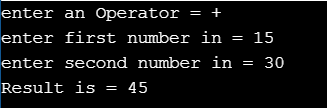
    C program to make a calculator using the switch statement.

    /*perform arithmetic calculation on integers in C language*/ #include<stdio.h> #include<conio.h> void main() {     char op;     ...